SMS Text Alerts for Venue Operators
Program: SyncIRL venue operator crew alerts · Effective July 29, 2026
This page documents the SMS text-alert program that SyncIRL LLC offers to venue operators who use the SyncIRL partner portal at partners.syncirl.com. It describes exactly how an operator consents to receive text messages, the disclosures shown at the point of consent, the messages we send, and how to opt out. Because the opt-in form is inside the operator's authenticated partner-portal account, this page also includes a screenshot of that opt-in so the flow can be reviewed publicly.
SMS consent is not a condition of using SyncIRL, of creating an account, or of completing any transaction. It is not bundled into our Terms of Service or into any signup, registration, or checkout step. Accepting the SyncIRL Terms does not opt anyone in to text messages.
The opt-in is a standalone card on an already-signed-in operator's dashboard. It is separate from account creation, separate from venue onboarding, and separate from claiming a crew. An operator can skip it entirely, or decline it with a single click, and keep the full use of their account: they continue to receive every crew opportunity by email and on their dashboard. Nothing is withheld, gated, degraded, or priced differently for an operator who declines.
Consent is captured by a dedicated checkbox that is unchecked by default, sitting apart from any other agreement. The "Turn on text alerts" button stays disabled until the operator ticks it. Consumers of the SyncIRL app are never enrolled in this program at all.
1. Who receives these messages
Only venue operators who own or manage a venue on SyncIRL and who have actively turned on text alerts in their partner-portal dashboard. Consumers of the SyncIRL app do not receive these operator messages. This is an account-notification program for business operators, not marketing.
2. How an operator opts in (the call to action)
Opt-in is an explicit, affirmative, optional action taken by the operator, on a dashboard they have already signed in to. Nothing is pre-selected and no consent is assumed. The steps:
- The operator signs in to their existing account at partners.syncirl.com. Signing in requires no SMS consent.
- On the dashboard they see a card titled "Text me when a crew is up for grabs." The card states in plain text, above the form, that it is optional and that skipping it costs the operator nothing.
- The operator types their own mobile number into the phone field.
- The operator ticks a dedicated consent checkbox that is unchecked by default and applies only to this SMS program. It is not combined with the Terms of Service or with any other agreement. Until it is ticked, the "Turn on text alerts" button is disabled.
- The operator clicks the "Turn on text alerts" button. Only this deliberate click enables messages. There is no default-on setting and no pre-checked box.
Declining: the operator simply leaves the checkbox unticked and uses the rest of the dashboard. There is no dismissal required and no consequence. An operator who has previously opted in sees a "Turn off" control on the same card and can revoke consent in one click, or reply STOP to any message.
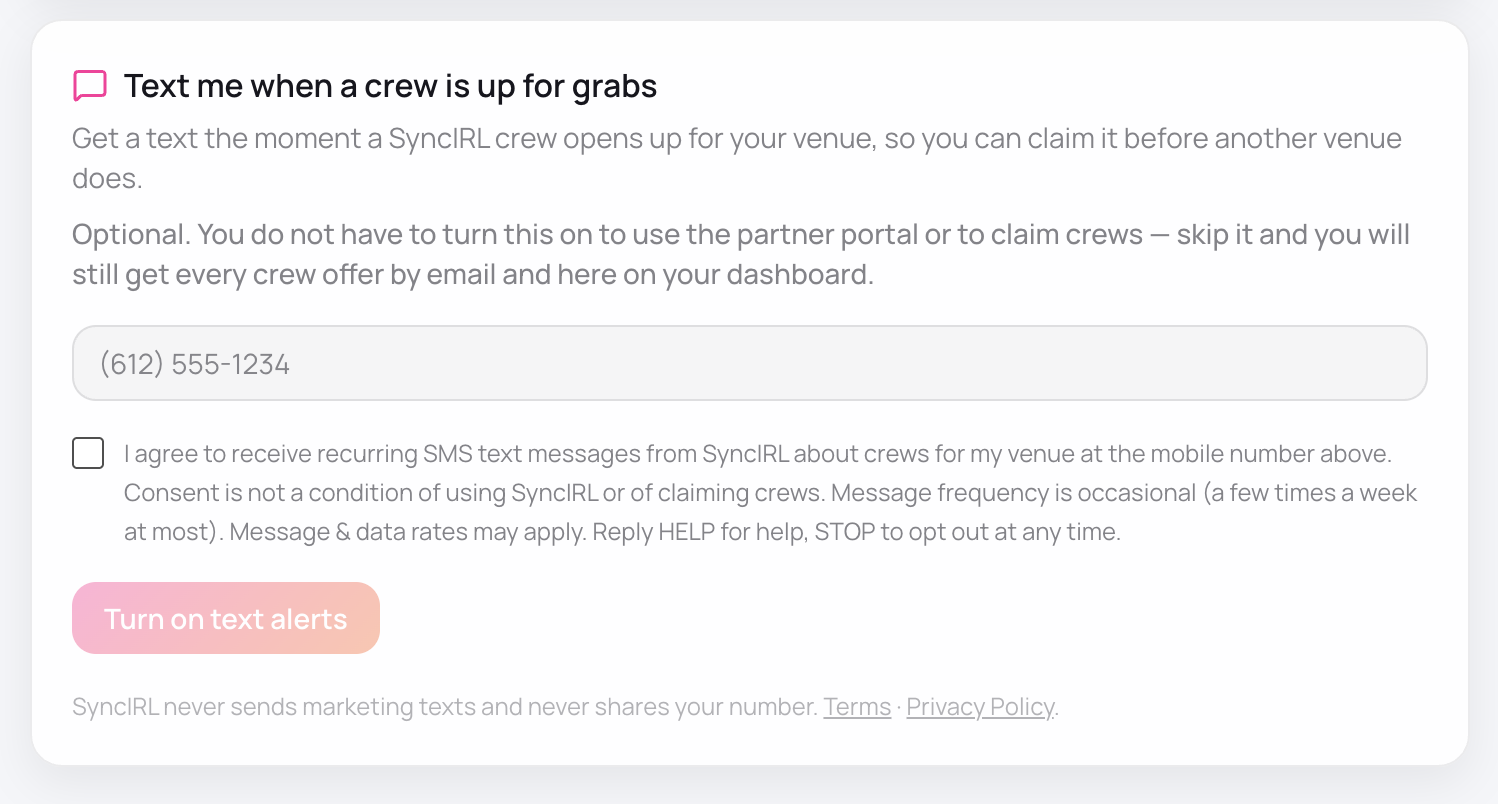
3. Consent disclosure shown at opt-in
The following text sits immediately beside the dedicated, unchecked consent checkbox, at the point of consent. Ticking the box is the operator's consent, and the submit button is disabled until it is ticked:
Shown above the form, before the operator enters anything:
4. What the messages say
An operator receives an account notification when a SyncIRL crew becomes available for their venue to claim. This is the only kind of message this program sends. The exact messages, with the venue name and activity filled in:
5. Message frequency, rates, HELP and STOP
- Frequency: occasional, a few times a week at most, based on crew availability for the operator's venue.
- Rates: message and data rates may apply, per the operator's mobile carrier plan.
- HELP: reply HELP to any message to receive help and contact information.
- STOP: reply STOP to any message to opt out of all further messages at any time. The operator can also turn text alerts off directly in the partner-portal dashboard.
6. Privacy
We do not sell your personal information. We do not share your mobile phone number or SMS opt-in consent with third parties for their own marketing or promotional purposes. Full details are in our Privacy Policy, which includes a dedicated section on SMS and phone communications and the venue-operator alert program.
See also our Terms and Conditions.
Contact
SyncIRL LLC
Email: support@syncirl.com
Website: syncirl.com